Navigating the world of football kits is a journey through history, design, and passion. For fans of Liverpool FC, this journey is particularly rich, tracing back over a century of iconic jerseys that have become synonymous with glory, emotion, and the spirit of Anfield. This article delves into the history of Liverpool kits, focusing on a pivotal period and a topic of great interest to digital football enthusiasts: the Liverpool Kits 2019/20 DLS 26.

Main content:
A Legacy in Red: The Evolution of Liverpool’s Home Kit
Liverpool’s identity is inextricably linked to its all-red home kit, a symbol of power and danger championed by the legendary Bill Shankly. However, the club’s origins tell a different story. The very first Liverpool shirt was a blue and white quartered design, a stark contrast to the modern, imposing red. Shankly’s 1964 decision to switch to all red—from the shirt to the shorts and socks—was a masterstroke in psychological warfare, a move that fundamentally reshaped the club’s image and struck fear into opponents. This bold choice transformed the kit from a simple uniform into a powerful statement of intent.
The home kit’s design has evolved with time, but the core essence of red remains. Kit manufacturers like Umbro, Adidas, Reebok, and New Balance have all left their mark, each adding their unique design philosophy while respecting the club’s deep-rooted traditions. The current partnership with Nike continues this legacy, blending modern performance technology with classic Liverbird symbolism.
Away from Anfield: The Changing Colours of the Reds
Liverpool’s away kits have historically been more experimental, offering designers a chance to play with different colours and patterns. For decades, the away shirt was often yellow or white, a classic combination that created a clean and traditional look. However, modern designs have introduced a wider palette, from bold greens and purples to more abstract patterns. These kits often carry a special meaning, paying homage to significant moments or players in the club’s history. While the away kits are known for their variety, they always maintain a connection to the club’s heritage.
The Historic 2019/20 Season: A Kit for the Champions
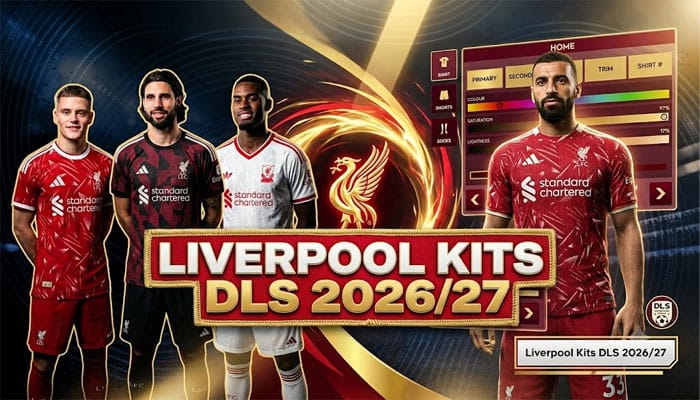
The 2019/20 season holds a hallowed place in Liverpool’s history. It was the year the club finally ended its 30-year wait for a Premier League title, cementing their place as the champions of England. The kits worn during this historic campaign, produced by New Balance, are highly sought after by fans and collectors alike. The home kit was a deep crimson, accented with thin white pinstripes and gold details, a nod to the club’s historic crest. The away kit was a striking white with navy and red details, while the third kit was a sleek black and grey design. These jerseys are not just pieces of clothing; they are relics of a triumphant season, forever tied to the moments of lifting the Premier League trophy.
Liverpool Kits 2019/20 DLS 26: Bringing the Champions to Your Game
The fascination with the 2019/20 kits extends beyond the physical pitch and into the digital realm. Fans of the popular mobile football game, Dream League Soccer (DLS), are constantly searching for kits to customize their virtual teams. The phrase Liverpool Kits 2019/20 DLS 26 is a key search term for players looking to recreate that iconic championship-winning team within the game’s latest iteration, DLS 26.
To add these kits to your DLS 26 team, players typically need to find and import the kit’s URL, which points to the high-resolution image file. The popularity of the 2019/20 kit in DLS 26 is a testament to its enduring appeal. It allows gamers to manage a virtual version of Jürgen Klopp’s title-winning squad, complete with the authentic look that defined their historic success. The meticulous details, from the New Balance logo to the Standard Chartered sponsor and the gold Premier League patches, can all be replicated in the game, providing an immersive and nostalgic experience for fans.
How to import Liverpool Kits 2019/20 in DLS 26
Step 1: Click the Copy URL button for the corresponding Kits located below
Step 2: Open Dream League Soccer 26
Step 3: Select My Club.
Step 4: Select Customise.
Step 5: Click Custome Kit.
Step 6: Paste the Kit URL copied in Step 1.
Step 7: Click Confirm.
Home Kit
https://dlsgame.net/wp-content/uploads/2025/08/Liverpool-Home-Kit-2019-20-DLS-25.png

Away Kit
https://dlsgame.net/wp-content/uploads/2025/08/Liverpool-Away-Kit-2019-20-DLS-25.png

Third Kit
https://dlsgame.net/wp-content/uploads/2025/08/Liverpool-Third-Kit-2019-20-DLS-25.png

GK Kits
https://dlsgame.net/wp-content/uploads/2025/08/Liverpool-GK1-Kit-2019-20-DLS-25.png

https://dlsgame.net/wp-content/uploads/2025/08/Liverpool-GK2-Kit-2019-20-DLS-25.png
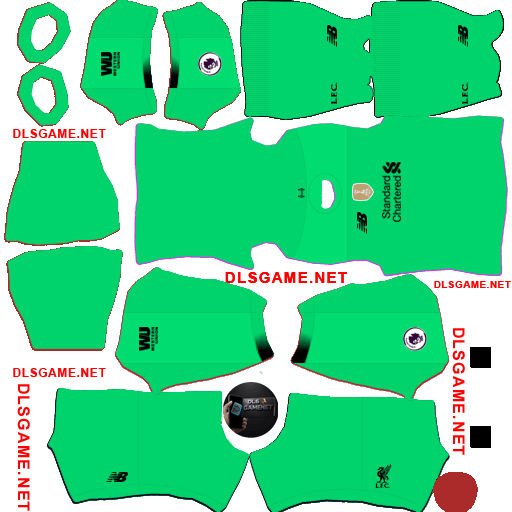
https://dlsgame.net/wp-content/uploads/2025/08/Liverpool-GK3-Kit-2019-20-DLS-25.png

Logo Liverpool DLS 512 x 512
https://dlsgame.net/wp-content/uploads/2025/03/dls-512x512-logo-liverpool.png
https://dlsgame.net/wp-content/uploads/2025/03/dls-512x512-logo-liverpool-1.png